
Business and leisure travelers can NOW save big—up to 59% off—on flights to South America.
In the past six months, FCF has written six special reports for oneworld (American) and Star Alliance (United) members looking to deploy miles in order to achieve or maintain elite status while flying up front.
In December, we focused on American to Europe, in January to Asia on American, in February to South America on American, in March on the Transcon on American, in April to Hawaii on American, and in May to Asia on United.
By the way, many of these tactics also work for anyone who can’t find a low Business Class fare, and for those who don’t even have many American or United miles.
SAME APPROACH—APPLIED TO UNITED’S SOUTH AMERICA ROUTES
Our pitch: As we’ve been saying, you might want to forget about free mileage awards because they don’t earn elite credit, and it can be difficult at times to find free award availability. Instead, use miles to upgrade because availability is much greater, and you earn miles and elite credit.
UNITED’S UPGRADE PROGRAM
To upgrade to Business Class to southern South America (Argentina, Brazil, and Chile), United requires 25,000 miles plus a co-pay of $500 each way on the lowest upgradeable economy fares (S, T, K, L, and G) and $475 on W fares. When Business Class fares are high, using miles for an upgrade can offer a great return.
HOW TO SAVE 59% ON HIGH-FARE ROUTES
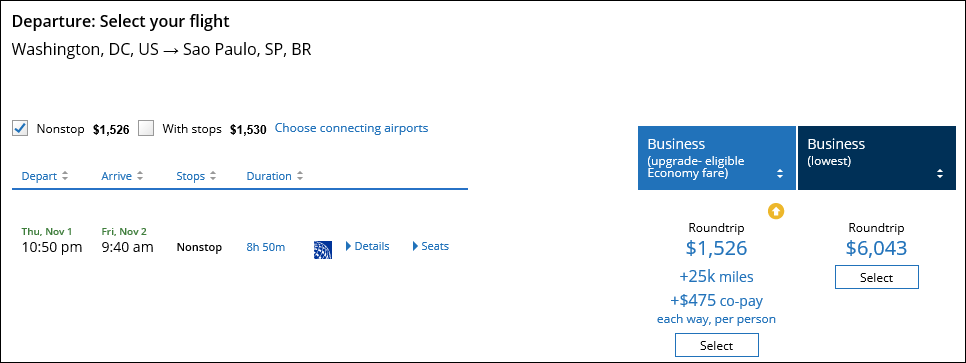
Say you’re traveling Washington, DC to São Paulo, often an expensive Business Class route, even when booked way in advance. The lowest United economy fare is currently $1,526, while Business Class is $6,043 ($4,517 more). So, even with the $950 co-pay, you can save $3,567 (59%) off the published fare by using miles. (See chart below for upgrade award availability survey.)
United.com screenshot showing fare difference between economy and Business Class plus Upgrade Math:
LOW ECONOMY ROUTE SAVES 54%
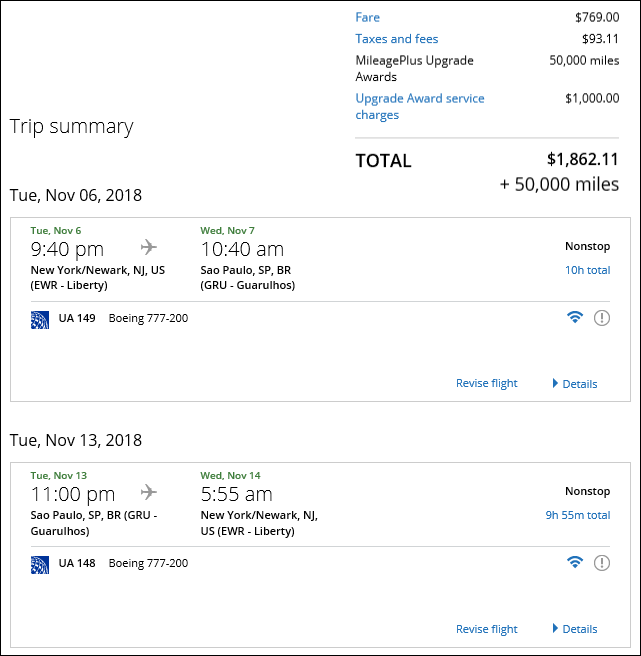
Newark to São Paulo is one of United’s lowest economy fare routes, currently starting at $862 round-trip, while Business Class is $4,083. Even with the $1,000 co-pay, you can save $2,221 (54%) off the published fare by using miles.
United.com screenshot with 54% savings opportunity:
BRIDGE ROUTE CONNECTIONS CAN SAVE UP TO 56%
Smart travelers use the long-haul Business Class flight as a “bridge,” which means getting the premium seat on that leg, the one that matters most, and using economy to reach the gateway if you must.
From the U.S., that means you should consider buying an economy through-fare ticket, meaning a fare that gets you the entire itinerary on one ticket. If upgrade space is available on the domestic segments, grab it, of course, as the cost is the same.
Example: On Chicago-Santiago the through-fare ticket (connecting via Houston) costs $912 in economy, instead of $4,371 in Business Class. Even with the $1,000 co-pay to upgrade the long-haul segment (Houston-Santiago), you save $2,459 (56%) off the published fare by using miles.
Use our survey below to have an idea of upgrade availability on the long-haul segment.
WHAT TO DO WHEN AN UPGRADE IS ONLY AVAILABLE ONE WAY?
United lets you combine economy and Business Class fares, so you can upgrade the flight-segment that has upgrade space and book the other leg in Business Class. On Washington, DC-São Paulo, the combined coach-Business Class fare is $3,846, while round-trip Business Class is $6,043. So, even with the $475 one-way co-pay, you can still save (28%) by using miles one way.
TRAVELING ONWARD IN SOUTH AMERICA,
BUT NOT ON UNITED?
Example of how you can get almost anywhere on one ticket: Say you want to fly from Houston to Recife (known as the “Venice of Brazil” because of its numerous waterways and bridges). On United, that could mean making a connection in São Paulo.
The through-fare is $1,771 in economy round-trip versus $6,149 in Business Class. You upgrade the bridge legs of the trip, Houston – São Paulo – Houston, which is easy by referring to our cheat sheet below to know the best dates for upgrade availability.
Even with the $900 co-pay (plus 50,000 miles), you can save 57% ($3,478) off the published fare by using miles. Note that the connecting leg (São Paulo-Recife) will be in economy on partner airline Azul or Avianca Brazil.
Onward connections are easy if you stick with United’s partners and book the entire trip on one ticket, in economy, and just upgrade the United long-haul segment/s to Business Class. Azul and Avianca have flights to other South American destinations, including: Recife, Brasília, Porto Alegre, and many more.
HOW TO BOOK MILEAGE UPGRADES ON UNITED
Determine availability date-clusters online using our survey below.
- Confirm that the flights/dates you want are available for the upgrade using miles by requesting upgrade award space on the “All search options” page.
- Make sure you have the miles required in your account.
- Click on the “Upgrade type” search in the middle of the page.
- In the “Fare preferences” section, select the “Buy Economy and upgrade” option to search for upgrade space to Business Class. Your search result will not only show fares and flight schedules, but also the flights offering an upgrade and the cost.
- Click on “Details” to find out if the upgrade space is available.
- Select your flights and book your ticket.
This can all be done online. (For detailed screenshots of the steps go here.) If you want to book over the phone, just call (800) 421-4655.
HOW ANYONE CAN PLAY THIS UPGRADE GAME
Don’t have any or enough United miles? No problem. Just buy United miles when they go on sale (recent opportunity here), or transfer Starwood points to Marriott and redeem points with Marriott’s Travel Packages (for more information go here), or transfer points from Chase to United.
Sweet Redeem Survey: United Mileage Upgrades to South America
[table_opt id="5966" style="blue-header" width="default" alignment="thcenter" heading="thcenter" rows="tdcenter" responsive="no" /]
Business and leisure travelers can NOW save big—up to 59% off—on flights to South America.
In the past six months, FCF has written six special reports for oneworld (American) and Star Alliance (United) members looking to deploy miles in order to achieve or maintain elite status while flying up front.
In December, we focused on American to Europe, in January to Asia on American, in February to South America on American, in March on the Transcon on American, in April to Hawaii on American, and in May to Asia on United.
By the way, many of these tactics also work for anyone who can’t find a low Business Class fare, and for those who don’t even have many American or United miles.
SAME APPROACH—APPLIED TO UNITED’S SOUTH AMERICA ROUTES
Our pitch: As we’ve been saying, you might want to forget about free mileage awards because they don’t earn elite credit, and it can be difficult at times to find free award availability. Instead, use miles to upgrade because availability is much greater, and you earn miles and elite credit.