
Over the last year FCF has delivered lots of special reports on upgrading with United miles for travel to all parts of the world: Asia, South America, Europe, and the South Pacific. Moreover, we’ve uncovered countless, specific pre-baked trip alerts showing availability for non-stop, long-haul flights, such as Los Angeles to Sydney.
The Fly in the Long Haul Availability Ointment
But here’s the thing. If you live in, say, Houston, and you spot that juicy Los Angeles-Sydney opportunity, you might run into a small, but not insurmountable glitch. (Glitch. noun: an unexpected setback).
You need to know that if you try to add your home airport’s connecting flight to the international nonstop long-haul flight, and if the connecting flight has no upgrade space, then the international flight will also show no upgrade space.
For a Houston resident wanting to see a koala, that’s heartbreaking. And we can’t have that. Koalas are awesome. So don’t despair. FCF has a plan of action.
In this special report, we take a closer look at how to use FCF’s Sweet Redeem upgrade alerts with United—when you have to make a connection via other U.S. cities to the international long-haul flight.
Adding a U.S. connecting FLIGHT
to the long-haul international flight
From the U.S., you should consider buying an economy through-fare ticket (i.e., Houston-Los Angeles-Sydney) that includes the entire itinerary on one ticket. Then use miles to upgrade from the gateway to your international destination, at a minimum. If upgrade space is available on the domestic segments, grab it, as the cost is the same.
Workaround to booking problems for connecting flights
Here’s what you need to do about United upgrade award space when you add connecting flights and use miles for an upgrade:
Step 1: Find the long-haul flight/segment first. Get fresh availability on the non-stop long-haul and find the dates you want for the departure and the return. But don’t include the connecting flight from your home airport just yet.
Step 2: Check availability on the domestic segment. Change the departure to your home airport, for example Houston-Sydney.
Step 3: Add the domestic connecting flight. Without losing the upgrade space for the long-haul on one ticket, you’ll need to search for the upgrade by using United’s multi-city search. This is really important to enable United’s computer system to view each flight segment separately, rather than as a whole.
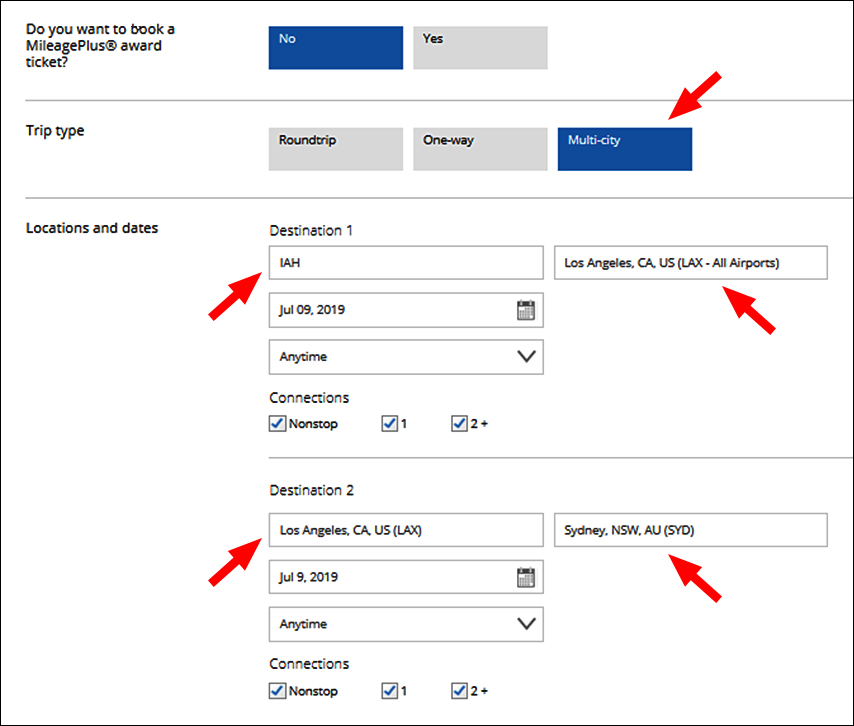
Step 4: United will price the miles and co-pay needed for the upgrade as two tickets (total cash ticket cost is not affected by this as long as your connecting flight is booked in the same class of service and has a connection of 24 hours or less for an international flight). When you purchase your ticket, United will take out miles based on two tickets.
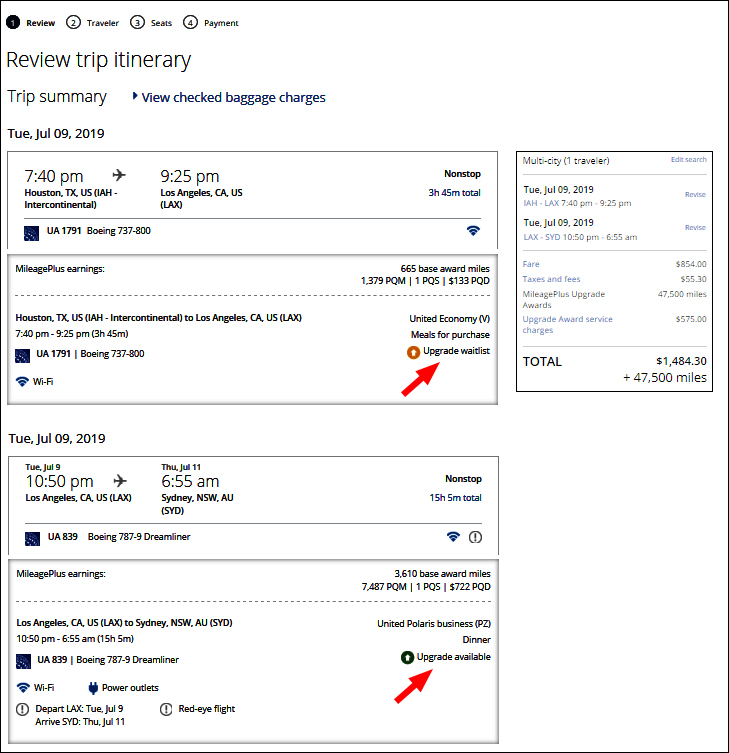
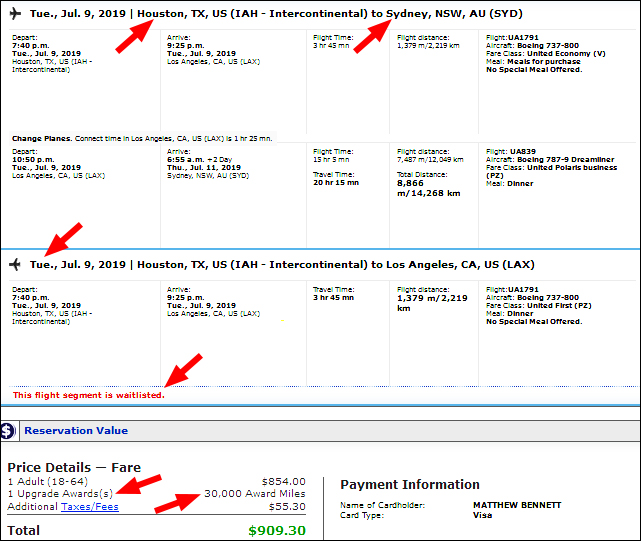
Step 5: Call United at 1-800-864-8331 and ask for a supervisor (this might take a couple of calls as at times agents will not transfer you to a supervisor or even check with a supervisor as how to help you). United will manually have to override the preset cost and make the correction to show the upgrade cost from your departure city to your destination city. You need a senior agent to understand this.
At this point, United will do a full refund of the co-pay and miles, and then recharge the correct amount, for miles and co-pay, while you are on the phone. You have to do it this way because you will have a waitlist on your domestic flight (a good thing) and you will have the upgrade confirmed for the long-haul international flight.
Step 6: Pat a koala. Bear in mind that as cute as they are, their claws are kind of sharp.
Not crazy about being on the phone with United but OK with the domestic flight in coach? Then you should still book via the multi-city search, but don’t request a waitlist. Just confirm the domestic United flight in economy, book the upgrade for the long-haul, and you won’t have to call United, because your domestic flight is not waitlisted. The miles and co-pay charged are just for the international leg of your flight.
Final thought: What you want to avoid is having all your flights on a waitlist, as outlined in step two.
Cost not to follow the workaround booking solution:
- Buying two separate tickets may involve rechecking in and possible baggage issues
- Paying mileage and co-pay charges for both tickets
- Missing out on the long-haul upgrade in a premium cabin
Side notes:
- United does not hold an upgrade seat without mileage in your account.
- United does allow a fare-lock hold on an upgrade seat.
- United does not allow a fare-lock on waitlisted flights.
Why use miles for an upgrade over free mileage award tickets?
FCF often likes using miles for an upgrade over free mileage award tickets, which don’t earn elite credit and are difficult to find anyway. It’s better to use miles to upgrade because availability is much greater and the ticket earns miles and elite credit.
To take advantage of FCF’s Sweet Redeem upgrade awards, you use the long-haul Business Class flight as a “bridge,” which means getting the premium seat on the international leg and using, if you have to, economy to reach the gateway(s).
[aside headline="Recent Examples of Lucrative United Upgrades:" alignment="aligncenter" width="big" headline_size="default"]
United Upgrades from California to China and Japan, for Up to Four Seats
Fly to Australia Business Class 45% to 75% Off With United Miles
Spring and Summer Upgrades On United Just Found to Europe, Four Seats
Upgrade Opportunities to Buenos Aires, Lima, Rio, Santiago, and Sao Paulo [/aside]
Over the last year FCF has delivered lots of special reports on upgrading with United miles for travel to all parts of the world: Asia, South America, Europe, and the South Pacific. Moreover, we’ve uncovered countless, specific pre-baked trip alerts showing availability for non-stop, long-haul flights, such as Los Angeles to Sydney.
The Fly in the Long Haul Availability Ointment
But here’s the thing. If you live in, say, Houston, and you spot that juicy Los Angeles-Sydney opportunity, you might run into a small, but not insurmountable glitch. (Glitch. noun: an unexpected setback).
You need to know that if you try to add your home airport’s connecting flight to the international nonstop long-haul flight, and if the connecting flight has no upgrade space, then the international flight will also show no upgrade space.
For a Houston resident wanting to see a koala, that’s heartbreaking. And we can’t have that. Koalas are awesome. So don’t despair. FCF has a plan of action.
In this special report, we take a closer look at how to use FCF’s Sweet Redeem upgrade alerts with United—when you have to make a connection via other U.S. cities to the international long-haul...